
Figma Config India 2026: Figma’s answer to the AI labs

Team Rango was at BIEC in Bengaluru for the first Config India, Figma’s first conference in the country. More than 30,000 people registered to attend in person or online, Figma’s largest international Config yet.
Why this one mattered: It was a strange year to hold a design conference. In April, Anthropic’s chief product officer left Figma’s board, and Anthropic launched Claude Design that month. And code-native tools like Paper, which we also use a lot, are coming up on the other side. So we came to Bengaluru with one question: what is Figma’s answer?
Our reading of the keynote: Figma’s answer goes beyond generation. It brings code, the canvas and design system context closer together, for people and for agents. Several pieces are available now, and code sources in libraries remain in closed beta.
In this article: what Figma launched, what you can use today, why it chose India, and three checks before you trust an agent with your codebase.
Checked: October 16, 2026, against Figma’s announcements, help center and keynote.
Quick answer: what happened at Figma Config India 2026?
Figma held its first Config in India on October 15, 2026, at BIEC in Bengaluru, and moved code layers and Specs into open beta. The essentials:
When and where: Thursday, October 15, 2026, at BIEC, the Bangalore International Exhibition Centre, on Tumkur Road in Bengaluru. The one-day event reached capacity; in-person places were by application and virtual attendance was free.
Keynote: Dylan Field’s opening keynote was scheduled for 10:15 am IST in Hall 5. Watch the recording.
Who spoke: Dylan Field opened. Masaba Gupta of House of Masaba gave the closing keynote with Figma’s Chief Design Officer Loredana Crisan. Indian teams, including Gully Labs and Freshworks, spoke in between.
What launched: code layers and Specs in open beta, Payload in Figma Make, design system context for agents and 20 new MCP partners.
Why India: it’s Figma’s second-largest market by daily active users.
Watch our two Shorts from the floor
We filmed two short videos there. The first is from the day itself, with our main takeaway: design and build are now one step, and design is still the differentiator.
The second is our wrap-up, on why Figma’s answer is context and why real designers ship.
From a line to a loop
For years, product work ran in a line: think, design, hand it off, then build. Field’s point in the keynote was that the line made sense when code was expensive. Every change cost time and money, so you measured twice and cut once. AI flipped that equation.
He split the new work into two modes. Building to think is fast and loose: you build something to react to and find out what you actually want. Building to ship is deliberate, and that’s where precision, craft and security matter. Between the two came the line that drew a cheer from the room: “don’t delegate your thinking to AI.”
Earlier in the keynote, Field said, “Design is the differentiator.” It’s the line we came back with too: you still win by design. The practical question is how to keep that judgment when an agent can build the first version.
What did Figma announce at Config India 2026?
In June, at Config in San Francisco, code layers were a waitlist. In Bengaluru, they and more went into hands-on betas.
Code layers, in open beta on all plans
A code layer holds working code on the canvas. Teams can bring in a coded prototype from GitHub, a local folder or another tool, duplicate it to explore ideas side by side, refine it by prompting the Figma agent, and use Extract designs to turn a screen back into editable Figma layers.

A code layer runs a working app preview on the canvas, next to the code behind it. Image: Figma
Important: code layers use AI credits. On paid plans, creating and editing them is free only through November 4, 2026, so run any trial before then.
Figma Specs, in open beta on paid plans
Specs are Markdown documents that live on the canvas next to the designs they explain. They hold product context, so people and agents work from the same brief. Figma’s demo drafts a technical spec from a codebase with the GitHub connector.
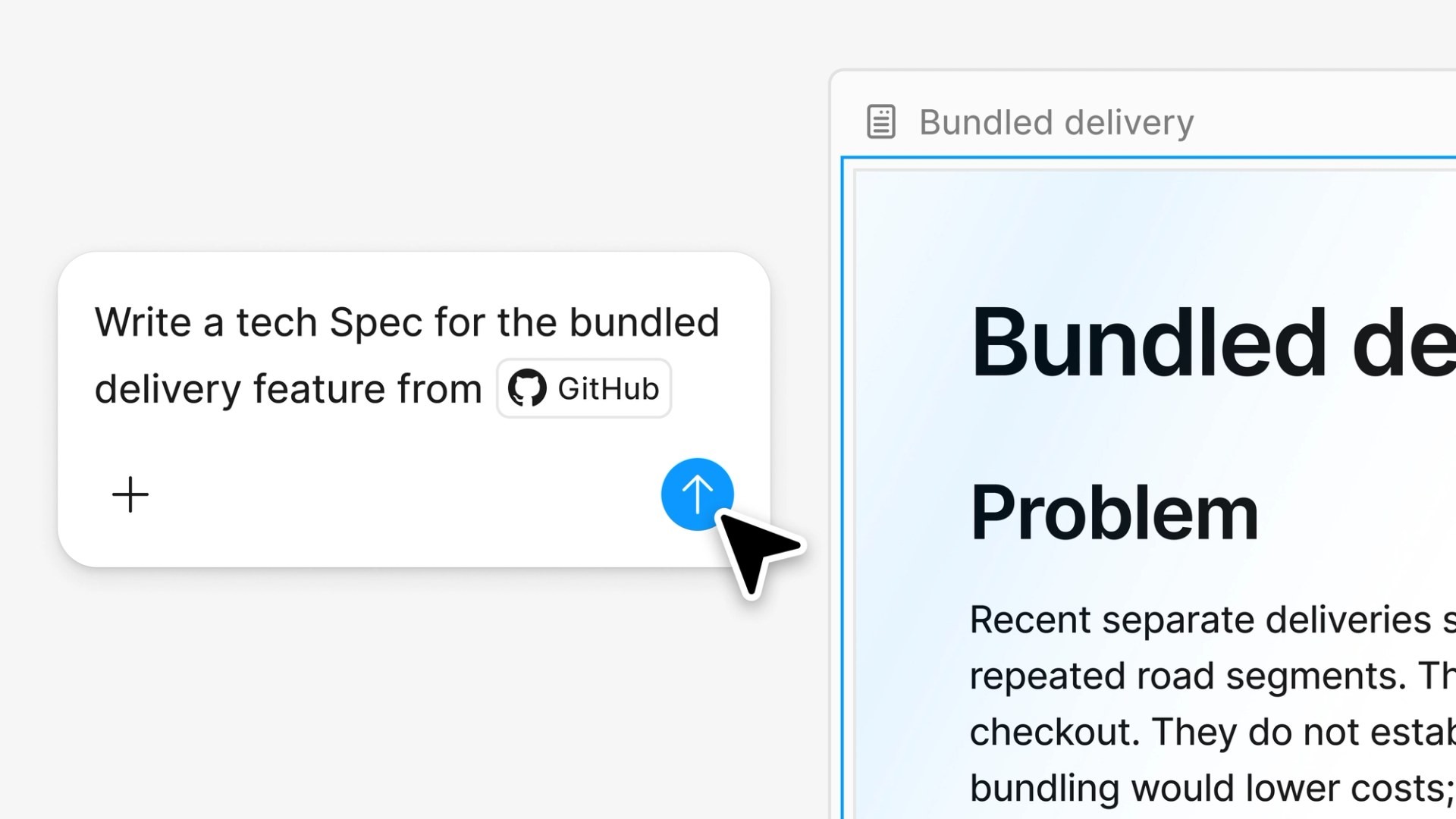
In Specs, an agent drafts a technical spec from a GitHub repo as a document on the canvas. Image: Figma
Payload in Figma Make, available now
Payload, the open-source content framework that joined Figma last year, now powers data-backed sites in Make. Prompting an app also sets up a database, file storage, user login and an admin panel, so a marketer can save drafts and publish updates to the same content a designer prototyped with.

Payload in Figma Make sets up content storage and an admin for a site, with a live preview. Image: Figma
Design system context for agents
Guidelines, in open beta on paid plans, and code sources in libraries, in closed beta, help agents follow your design system. A central hub, in preview, brings libraries, code sources and guidelines into one place. This is the context half of Figma’s answer: your design system stops being a file and becomes something agents can read.

The design system hub, in preview, brings libraries, code sources and guidelines into one place. Image: Figma
20 new MCP partners
Figma added 20 new MCP partner integrations, so agents in other tools can work with Figma context. Its announcement names some of them: OpenCode, Dia, JetBrains, Meta Muse and Sarvam, which Field called Figma’s first Indian MCP partner.
Important: an MCP connection lets another tool work with your Figma context. Check what each one can read and change before you turn it on.
Campus Leaders expands to India
Figma’s student program expands to Indian universities, its first country outside the US and Canada. The first cohort starts in January 2027, and applications are open until 11:59 pm IST on November 7, 2026.
What can you use today?
Note: availability checked on October 16, 2026 in Figma’s help center. The calls in the last column are our assessment.
Launch | Status | Our call |
|---|---|---|
Payload in Figma Make | Available now, all plans | Use it for content-led sites you already prototype in Make |
MCP improvements | Available now, all plans | Connect your coding agent and check what it can read |
Code layers | Open beta, all plans | Try one prototype; creating and editing is free on paid plans through November 4, 2026 |
Specs | Open beta, paid plans | Try it on one feature’s brief |
Guidelines | Open beta, paid plans | Try it with your design system |
Code sources in libraries | Closed beta | Wait for access before testing it with your codebase |
Design system hub | Preview | Wait for general access |
Three checks before you trust an agent with your codebase
The launches cover a lot of ground. Code layers bring a coded prototype onto the canvas, Figma’s MCP server lets agents work with Figma context, and code sources in libraries are in closed beta. Before any of it touches a production codebase, we’d ask three things:
Can an agent write inside the existing repository? The real one, not a copy.
Does it follow the repository’s conventions? The names, folders and components the team already uses.
Does it leave changes the team can review? A diff a person can approve before anything ships.
Code sources are in closed beta, and the launch details don’t say which of those checks depend on them. Until teams can run all three, pick the tool per project.
Our June recap covered the direction. Config India changed access: code layers moved from a waitlist to an open beta on all plans, while code sources stay in closed beta and the hub in preview.
Why did Figma bring Config to India?
Field answered this one himself on stage. India is Figma’s second-largest market by daily active users, with users in every state and union territory. The numbers Figma shared:
Second-largest by daily active users, as of June 30, 2026, and one of Figma’s fastest-growing markets.
More than 40% of BSE100 companies use Figma (Q2 2026). Figma also names Airtel, Groww, Swiggy, TCS and Zomato among the companies in India that use it.
Friends of Figma India had 23 chapters and over 33,000 members as of June 30, 2026.
A local base: an office in Bengaluru, which Field said opened about a year ago, and a Hindi version of Figma launched earlier this year.

Figma’s map of active users across India’s states and union territories. Image: Figma
In Figma’s survey of 507 respondents in India, 65% said they were excited about how work is changing, compared with 44% in the US and EMEA.
What this means for product teams in India and the US
For designers: try one existing flow as a code layer. Compare its behavior with the intended design, then use Extract designs to see what comes back as editable layers. Creating and editing is free on paid plans through November 4, 2026.
For product leaders: pilot Specs on one feature. Ask an engineer which decisions are still missing from the brief, then check whether the build follows the ones it does contain. Judge the pilot by how much clarification work is left over.
For founders: before moving a workflow, agree what a successful trial must show: changes in your existing repository, work that follows its conventions, and a review process your team owns. A working preview is one checkpoint. Accessibility and security review still belong in the launch plan.
For everyone: review each MCP connection’s permissions and capabilities before connecting it to your workflow.
Where Rango fits
Rango designs and builds websites, web apps and product UX for B2B SaaS and AI teams in India and the US. We work across Figma and code-native tools, and on our own site, agent edits land on a branch and a person publishes. If your team is deciding how to use code layers or agents in an existing product workflow, book a call to talk through the workflow, who reviews what, and what needs to be ready before shipping. See our web app design and front-end development work.
Questions people asked about Config India 2026
When was Figma Config India 2026?
Thursday, October 15, 2026. It was a one-day event, with an invite-only Leadership Collective for executives on October 13 at The Leela Palace.
Where was Config India held?
At BIEC, the Bangalore International Exhibition Centre, on Tumkur Road in Bengaluru. The main stage was in Hall 5.
Was this the first Config in India?
Yes. Dylan Field opened it as the first ever Config India, and it was also his first visit to the country.
Who spoke at Config India 2026?
Dylan Field gave the opening keynote, scheduled for 10:15 am IST. Sessions from Indian teams included Gully Labs’ Arjun Singh and Animesh Mishra on designing from India for a global audience, and Freshworks’ Sascha Trinkaus with Kaushal Cavale on designers shipping code. Masaba Gupta of House of Masaba gave the closing keynote with Figma’s Chief Design Officer Loredana Crisan.
How much did Config India tickets cost?
We couldn’t find a published price. In-person places were by application and the event reached capacity. Virtual attendance was free.
Can I watch the Config India keynote?
Yes. Watch Figma’s opening keynote, led by Dylan Field. Figma said all talks would be recorded.
What did Figma announce at Config India?
Code layers in open beta on all plans, Figma Specs in open beta on paid plans, Payload in Figma Make, design system guidelines and code sources for agents, 20 new MCP partner integrations including Sarvam, and Campus Leaders for Indian students.
Is India Figma’s second-largest market?
Yes, by daily active users, as of June 30, 2026, according to Figma.
What are Figma code layers?
Working code on the Figma canvas that teams can design with, duplicate, refine by prompting and turn back into editable layers. Code layers are in open beta on all plans and use AI credits, and creating and editing them is free on paid plans through November 4, 2026.
What is Figma Specs?
Markdown documents on the Figma canvas that hold product context for people and agents. Specs is in open beta on paid plans.
Was Rango at Config India?
Yes. Team Rango was at BIEC on October 15 and filmed the two Shorts above.
Sources
Figma: Config India, FAQ, agenda, opening keynote, Build by design, Figma deepens investment in India, code layers, Specs, Payload in Figma, what’s new from Config India, Config 2026 recap
Context: Introducing Claude Design (Anthropic), Anthropic’s CPO leaves Figma’s board (TechCrunch)
Images: product images from Figma’s launch posts, credited and linked under each one. The cover is an illustration made for this article.

Sagar Ludhiyani
Published On
Share on