->

Product demo videos

Updated September 2026

Product demo videos for SaaS and AI Teams.

Product demo videos for SaaS and AI Teams.

Product demo videos for SaaS and AI Teams.

Product demo videos for SaaS and AI Teams.

We make product demo videos for B2B SaaS, AI, data and fintech teams, built from your real interface by the people who design SaaS products.

We make product demo videos for B2B SaaS, AI, data and fintech teams, built from your real interface by the people who design SaaS products.

LakeFusion 6.0 release teaser, platform, graph and PIM layers stacking
Glider AI identity check animation with face, device, IP and camera verified
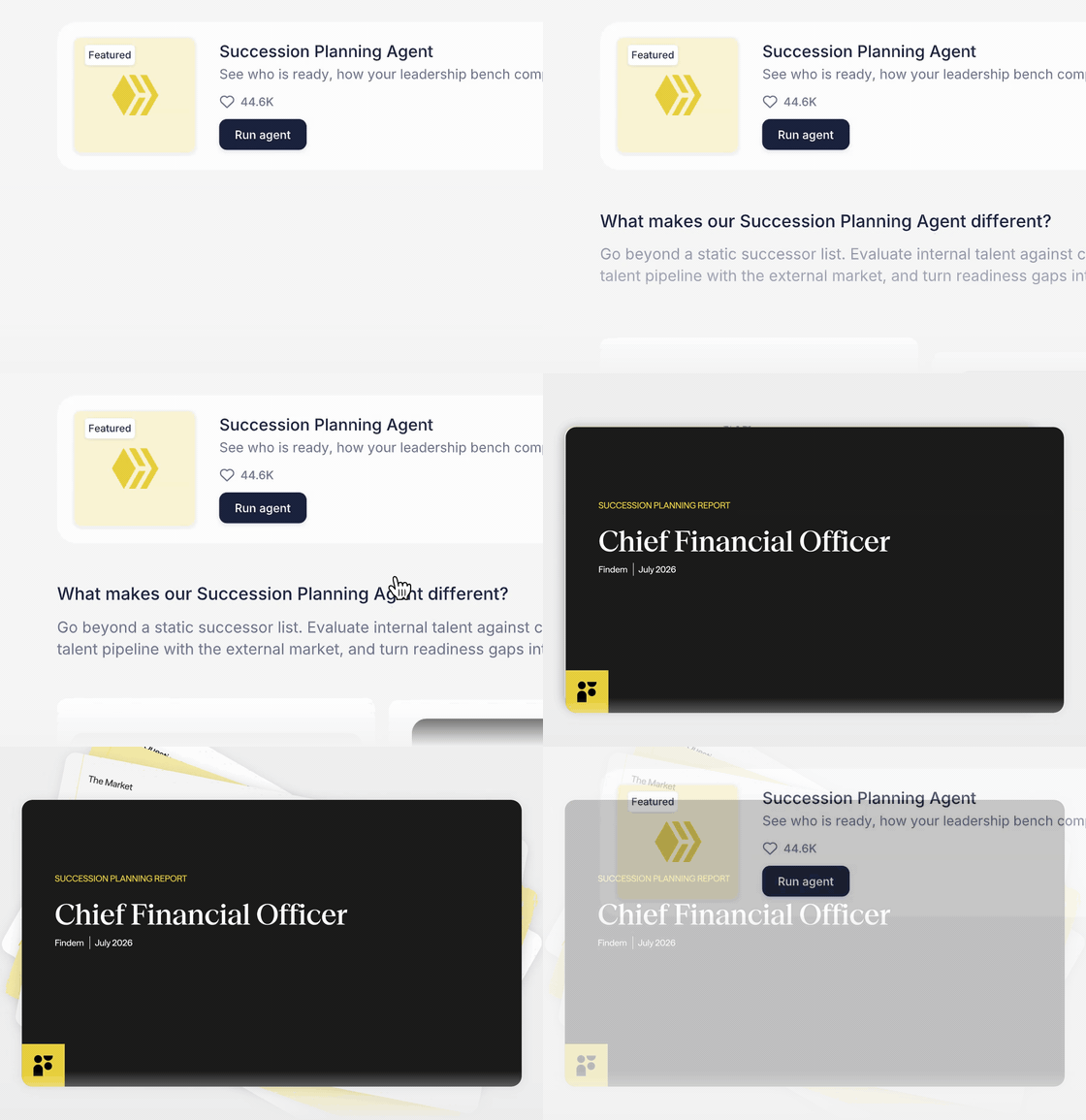
Findem succession planning agent animation with a talent pool overview
Glider AI skill assessment animation scoring critical thinking and communication
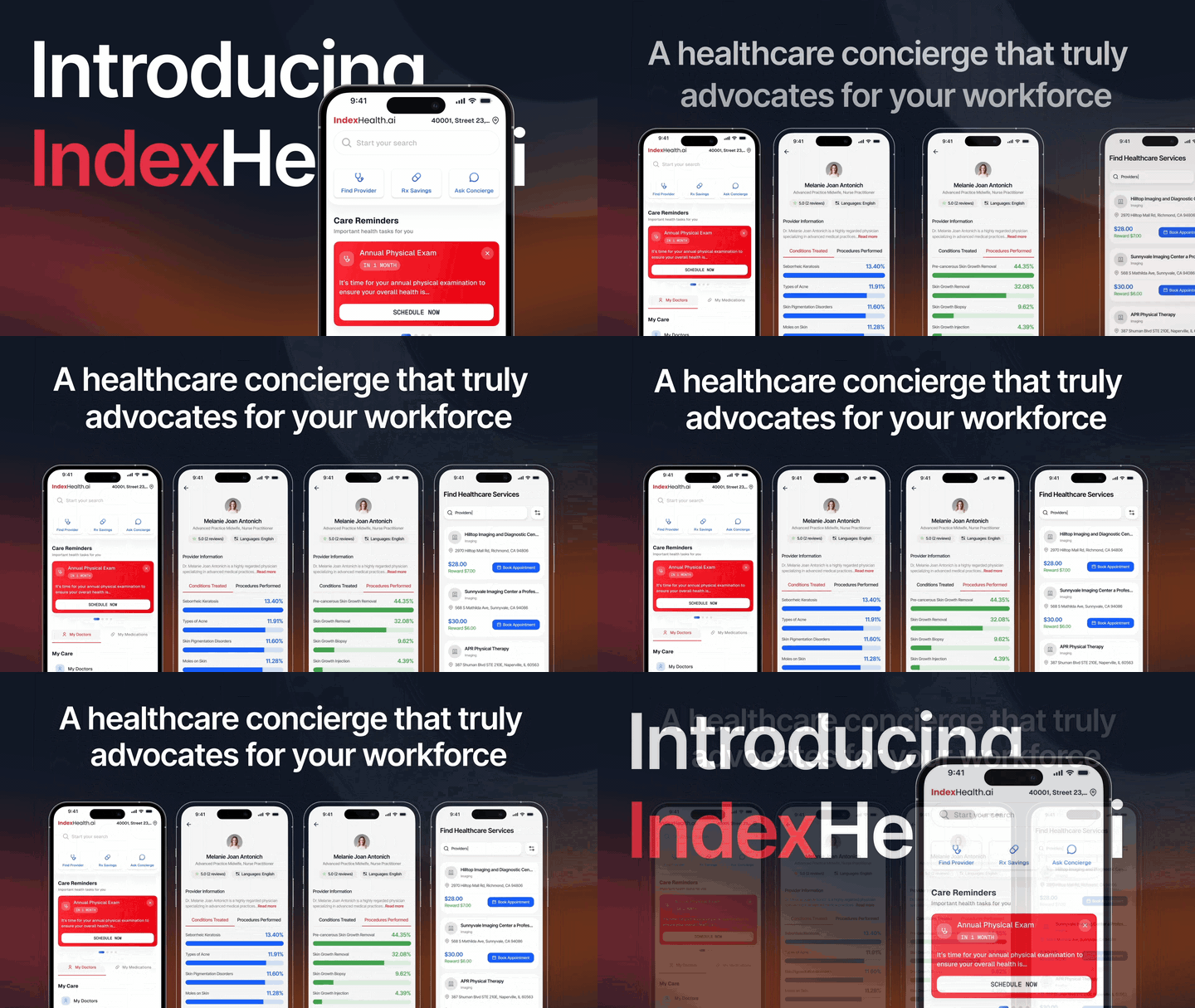
IndexHealth.ai launch film showing four healthcare app screens
Glider AI candidate integrity animation flagging suspicious activity
IndexHealth.ai app finding a dermatologist and listing nearby doctors

Two in three B2B buyers now prefer to buy without a sales rep (Gartner, 2026), and 63% of consumers would most like to learn about a product from a short video (Wyzowl, 2026). For many buyers, your demo video is The First Sales Call.

Two in three B2B buyers now prefer to buy without a sales rep (Gartner, 2026), and 63% of consumers would most like to learn about a product from a short video (Wyzowl, 2026). For many buyers, your demo video is The First Sales Call.

Two in three B2B buyers now prefer to buy without a sales rep (Gartner, 2026), and 63% of consumers would most like to learn about a product from a short video (Wyzowl, 2026). For many buyers, your demo video is The First Sales Call.

When we already design your product, the video starts from the same Figma files and the same people. When we don’t, we start with a walkthrough of your product, so Every Animated Screen matches what your buyers will actually use.

When we already design your product, the video starts from the same Figma files and the same people. When we don’t, we start with a walkthrough of your product, so Every Animated Screen matches what your buyers will actually use.

When we already design your product, the video starts from the same Figma files and the same people. When we don’t, we start with a walkthrough of your product, so Every Animated Screen matches what your buyers will actually use.

Every video starts from A Script You Approve and ships with Cuts For Every Channel, so your team never has to guess

Every video starts from A Script You Approve and ships with Cuts For Every Channel, so your team never has to guess

Every video starts from A Script You Approve and ships with Cuts For Every Channel, so your team never has to guess

which version goes where.

which version goes where.

which version goes where.

Anish Manglani
Md Shahanab Uddin
Amit Pathania
Faizan Mahida
Shreyash Chhatbar
Divyesh Vasani
Sagar Ludhiyani

Video types

Product demo, launch, tutorial and feature release videos. Same Team Throughout.

Product demo, launch, tutorial and feature release videos. Same Team Throughout.

Findem succession planning agent running and producing a succession report

01

Product demo videos

One real workflow, shown the way a buyer would use it, for the website, sales calls and outbound. Your interface is rebuilt in vector, so every screen stays sharp and on brand.

IndexHealth.ai launch film clip

02

Launch videos

ops0 product film clip walking through the product step by step

03

Tutorial videos

LakeFusion 6.0 release teaser headline

04

Feature release videos

Findem succession planning agent running and producing a succession report

01

Product demo videos

One real workflow, shown the way a buyer would use it, for the website, sales calls and outbound. Your interface is rebuilt in vector, so every screen stays sharp and on brand.

IndexHealth.ai launch film clip

Launch videos

ops0 product film clip walking through the product step by step

Tutorial videos

LakeFusion 6.0 release teaser headline

Feature release videos

Product demo videos

One real workflow, shown the way a buyer would use it, for the website, sales calls and outbound. Dashboards, data pipelines, API flows and AI agents are rebuilt in vector, so every screen stays sharp and on brand.

Launch videos

Tutorial videos

Feature release videos

What every video includes

Everything a product demo video needs, From Script To Screen.

Everything a product demo video needs, From Script To Screen.

Everything a product demo video needs, From Script To Screen.

01

Script and storyboard

We write the script with your product and marketing leads and board every scene, so the story is signed off before a single frame moves.

02

Your real interface, rebuilt

Screens are rebuilt in vector from your Figma files or the live product, so they stay sharp at any size. For AI products, we script the prompts and outputs with your team, so every answer on screen is one your product can give.

03

Animation in Jitter and After Effects

Jitter for fast, editable UI motion and short clips. After Effects for launch films with camera moves, 3D and compositing. We choose per shot, and many videos use both.

04

Voiceover, music and sound

AI voiceover in ElevenLabs or Magnific, so a script change doesn’t need a new recording session, plus music and sound effects timed to the cut and captions on every version, so the video works on mute.

05

A cut for every channel

16:9 for the website and sales decks, 1:1, 4:5 and 9:16 for LinkedIn, X and paid social, plus Lottie, WebM or MP4 loops for your site and product.

06

Updates when your UI changes

You get every cut and the source files, with licensed fonts and assets listed. When a screen changes, we paste the new design into the existing scene and keep the animation.

Script and storyboard

We write the script with your product and marketing leads and board every scene, so the story is signed off before a single frame moves.

Your real interface, rebuilt

Screens are rebuilt in vector from your Figma files or the live product, so they stay sharp at any size. For AI products, we script the prompts and outputs with your team, so every answer on screen is one your product can give.

Animation in Jitter and After Effects

Jitter for fast, editable UI motion and short clips. After Effects for launch films with camera moves, 3D and compositing. We choose per shot, and many videos use both.

Voiceover, music and sound

AI voiceover in ElevenLabs or Magnific, so a script change doesn’t need a new recording session, plus music and sound effects timed to the cut and captions on every version, so the video works on mute.

A cut for every channel

16:9 for the website and sales decks, 1:1, 4:5 and 9:16 for LinkedIn, X and paid social, plus Lottie, WebM or MP4 loops for your site and product.

Updates when your UI changes

You get every cut and the source files, with licensed fonts and assets listed. When a screen changes, we paste the new design into the existing scene and keep the animation.

AI builds the drafts. Designers Own Every Frame.

AI builds the drafts. Designers Own Every Frame.

AI builds the drafts. Designers Own Every Frame.

Illustration of a motion designer reviewing an animation timeline at night

Designer sign-off

AI drafts styleframes, scripts and timing early. Every frame that ships is directed, refined and reviewed by our designers, in your brand.

Illustration of a motion designer reviewing an animation timeline at night

Designer sign-off

AI drafts styleframes, scripts and timing early. Every frame that ships is directed, refined and reviewed by our designers, in your brand.

Illustration of a motion designer reviewing an animation timeline at night

Designer sign-off

AI drafts styleframes, scripts and timing early. Every frame that ships is directed, refined and reviewed by our designers, in your brand.

US hours, US contracts

The designers on your video work an agreed daily overlap with your US workday. Contracts are in USD, IP in the work we create is assigned to you, and MSAs and NDAs follow US terms.

US hours, US contracts

The designers on your video work an agreed daily overlap with your US workday. Contracts are in USD, IP in the work we create is assigned to you, and MSAs and NDAs follow US terms.

US hours, US contracts

The designers on your video work an agreed daily overlap with your US workday. Contracts are in USD, IP in the work we create is assigned to you, and MSAs and NDAs follow US terms.

Your video team, in your Slack

Your video team, in your Slack

Your video team, in your Slack

The people animating your video join your Slack or Teams, so feedback on a scene gets settled during agreed overlap hours, not in a weekly email thread.

The people animating your video join your Slack or Teams, so feedback on a scene gets settled during agreed overlap hours, not in a weekly email thread.

The Rango team in Rango t-shirts
LakeFusion 6.0 release teaser frames shown as square social posts

A clip for every release

If you ship every week, your story should too. Once the screens are final, each release can get a short clip within days, cut for the changelog, LinkedIn and paid social.

LakeFusion 6.0 release teaser frames shown as square social posts

A clip for every release

If you ship every week, your story should too. Once the screens are final, each release can get a short clip within days, cut for the changelog, LinkedIn and paid social.

LakeFusion 6.0 release teaser frames shown as square social posts

A clip for every release

If you ship every week, your story should too. Once the screens are final, each release can get a short clip within days, cut for the changelog, LinkedIn and paid social.

Frame from the ops0 launch film showing the new site on a laptop

A film for the big moments

A new product, a funding round, a category you’re creating. Those deserve more than a clip: a scripted film with real depth, cut for the homepage, the announcement post and the investor update.

Frame from the ops0 launch film showing the new site on a laptop

A film for the big moments

A new product, a funding round, a category you’re creating. Those deserve more than a clip: a scripted film with real depth, cut for the homepage, the announcement post and the investor update.

Frame from the ops0 launch film showing the new site on a laptop

A film for the big moments

A new product, a funding round, a category you’re creating. Those deserve more than a clip: a scripted film with real depth, cut for the homepage, the announcement post and the investor update.

How to choose a product demo video agency

Rango

Traditional agency

Video production agency

How to choose a product demo video agency

Rango

Traditional agency

Video production agency

Product Context

Product Context

We already design SaaS and AI products.

We already design SaaS and AI products.

Starts from your brand and campaign goals.

Starts from your brand and campaign goals.

Learns it in a discovery sprint.

Learns it in a discovery sprint.

How It Starts

How It Starts

Your Figma files or a walkthrough, then a script you sign off.

Your Figma files or a walkthrough, then a script you sign off.

A kickoff, then concepts to choose from.

A kickoff, then concepts to choose from.

A creative brief, then a script and storyboard.

A creative brief, then a script and storyboard.

Who Makes It

Who Makes It

Product designers and animators, one team.

Product designers and animators, one team.

An account team, with specialists brought in.

An account team, with specialists brought in.

A specialist video team, new to your product.

A specialist video team, new to your product.

A Change After Review

A Change After Review

The designer who built the scene revises it, within agreed rounds.

The designer who built the scene revises it, within agreed rounds.

Usually goes through an account manager.

Usually goes through an account manager.

Revisions within agreed rounds, then a change order.

Revisions within agreed rounds, then a change order.

When Your UI Changes

When Your UI Changes

We update the scene from the same files.

We update the scene from the same files.

Often a new statement of work.

Often a new statement of work.

A new scope, unless they keep your UI assets.

A new scope, unless they keep your UI assets.

Working Hours

Working Hours

Daily overlap with your US hours.

Daily overlap with your US hours.

Their office hours, with scheduled check-ins.

Their office hours, with scheduled check-ins.

Their office hours, in their time zone.

Their office hours, in their time zone.

Your Product On Screen

Your Product On Screen

Your real UI, rebuilt in vector.

Your real UI, rebuilt in vector.

Often brand-led visuals, with UI as mockups.

Often brand-led visuals, with UI as mockups.

Screen recordings, stylized UI or a mix.

Screen recordings, stylized UI or a mix.

Product demo videos that hold up on every screen, not just in the deck.

Product demo videos that hold up on every screen, not just in the deck.

Product demo videos that hold up on every screen, not just in the deck.

We caption every cut, size on-screen text to read on a phone, check text contrast against WCAG 2.2 AA, give web loops a pause control and a reduced-motion version, and export each cut at the length its channel needs.

We caption every cut, size on-screen text to read on a phone, check text contrast against WCAG 2.2 AA, give web loops a pause control and a reduced-motion version, and export each cut at the length its channel needs.

  • Script before animation

  • Storyboard sign-off

  • Styleframes in your brand

  • Real UI, rebuilt in vector

  • Captions on every cut

  • Voice in ElevenLabs or Magnific

  • 16:9, 1:1, 4:5 and 9:16 exports

  • Music and sound effects

  • Source files delivered

  • Lottie and WebM loops

  • Timestamped review links

  • Sized for fast loading

  • Updated when your UI changes

  • Readable text on phones

Tools we use

The tools we make product demo videos with.

The tools we make product demo videos with.

The tools we make product demo videos with.

We design every screen in Figma and Paper, animate in Jitter and After Effects, make voice and sound in ElevenLabs and Magnific, and export Lottie for the web. Need the product interface first? See web app design. Need the website around it? See B2B website design.
Figma logo

Figma

Paper logo

Paper

After Effects logo

After Effects

Jitter logo

Jitter

LottieFiles logo

LottieFiles

Claude logo

Claude

ElevenLabs logo

ElevenLabs

Premiere logo

Premiere

Illustrator logo

Illustrator

Photoshop logo

Photoshop

Magnific logo

Magnific

Blender logo

Blender

Cinema 4D logo

Cinema 4D

DaVinci Resolve logo

DaVinci Resolve

Framer logo

Framer

Webflow logo

Webflow

Frequently asked questions

Straight answers to Product Demo Video questions.

Straight answers to Product Demo Video questions.

What is a product demo video?

A product demo video shows how your product works through one real workflow, from the problem a buyer has to the result they get. Website demos usually run 60 to 120 seconds and live on the homepage, in sales emails and on demo calls.

What should a product demo video include?

A product demo video should show one buyer problem, the workflow in your real interface that solves it, the result the buyer gets, and one clear next step, such as booking a demo or starting a trial. We keep each video to one audience and one workflow, and caption it for viewers watching on mute.

What is the difference between a product demo video and an explainer video?

An explainer video explains the problem and why a solution matters, often with illustration, while a product demo video shows how your product solves it, using your real interface. Many SaaS teams use an explainer for top-of-funnel ads and a demo on the homepage and in sales follow-ups.

Should we use a product demo video or an interactive demo?

Use a product demo video to tell the story in a fixed length that works on mute in ads, social posts and sales emails, and use an interactive demo when a buyer wants to click through the product at their own pace. They work well together: the video earns the click, and the interactive demo lets serious buyers explore.

Should our demo use screen recordings or animated UI?

Screen recordings are quick and literal, but they show loading states, real data and clutter, and they break when the interface changes. Animated UI rebuilt in vector stays sharp at any size, uses clean sample data and can be updated scene by scene, which is why we rebuild the screens for most demo videos.

How long should a product demo video be?

Aim for 60 to 90 seconds on a homepage, two to three minutes for a sales walkthrough, 15 to 45 seconds for a feature release clip, and 15 seconds or less for paid social ads. We cut one master into each length, so every channel gets the version it needs.

How long does it take to make a product demo video?

Most product demo and launch videos take three to six weeks, depending on length, how many screens we rebuild and how settled the message is. Short release clips take days once the screens are final.

What affects the cost of a product demo video?

Length, the number of scenes and screens we rebuild, custom illustration or 3D, voiceover and languages, and how many cuts you need. We agree the scope before any animation starts, and any change to it is agreed with you before we make it.

Can you make a demo video before our product is built?

Yes. We animate from your Figma designs, so a launch or demo video can be ready for launch day, as long as the designs are final. If we designed the product, the screens are already in our files.

What do we need to provide?

A demo or sandbox account, or your Figma files, one lead from product or marketing for the script, and your brand assets. We handle the script, storyboard, animation, voice, music and every export, with a review link at each stage.

Do you use Jitter or After Effects?

Both. Jitter, including its AI features, for UI motion, release clips and fast social versions. After Effects for launch films with camera moves, 3D and compositing. Many videos use both, and a designer reviews every frame.

Will the video go out of date when our UI changes?

Not for long. You get the source files, and because the screens we rebuild are editable layers, we update only the scenes that changed instead of starting over.

Can a US company work smoothly with a remote team?

Yes. Rango is remote-first, and our process is built so it feels like a team sitting next to you. We agree overlap hours with your US workday before work starts, share progress in your Slack and project board as the work happens, and keep every file and decision open to you, so feedback turns around in hours, not overnight. Contracts are in USD, IP in the work we create is assigned to you, and MSAs and NDAs follow US terms. The designers and animators on your video stay on it from script to final cut.

If you’re considering
Working Together

If you’re considering
Working Together

If you’re considering
Working Together