
Webflow vs Framer in 2026: which is better when AI edits your site

Updated October 15, 2026, by the Rango team.
In October 2026, an AI agent updated a section of our homepage. It worked on a branch, and we checked a preview link before anything went live. In August, on one client’s Webflow site, a single invalid CSS rule stopped every publish while the API kept answering “success”. Only the Designer showed the real error.
On our projects, agents now make many routine edits, and AI assistants read our pages before some visitors do. When an agent edits your site, someone still has to review the change and own the publish. So the question we ask first is simple: who, or what, gets to publish?
The short answer
Choose Framer if your team is design-led, your site is mostly marketing pages and a blog, and you want an external agent’s edits to land on their own branch with a preview link. Framer includes that on its standard Pro plan.
Choose Webflow if your content is large or structured, you want schema on CMS templates without custom code and sitemap freshness dates, or static-code export matters: it needs a paid workspace plan, and CMS content moves separately as CSV.
Don’t choose on speed. Real-user data shows them almost tied.
Don’t choose on old reviews. Both platforms changed their pricing and features between February and July 2026.
At a glance, as of October 2026:
What matters | Framer | Webflow |
|---|---|---|
External-agent edits | Land on a branch with a preview link | Official MCP server; limits come from the agent’s role |
Built-in AI agent | Framer Agent: 1,000 credits a month on Basic, 3,000 on Pro | Webflow AI on every site plan (some Starter features need a paid workspace); AEO agents on Team |
External AI agents | Claude Code, Codex and others; free during preview | Any MCP client, on all plans |
Isolated branches | Included on Pro | Page branching on Team ($2,500 a month); through MCP, Enterprise only |
Schema on CMS templates | Custom code in the page head | Native field |
Sitemap last-modified dates | No | Yes |
Markdown for AI agents | All plans | Enterprise only |
CMS at the standard price | Pro: 10 collections, 2,500 items | Premium: 40 collections, 20,000 items |
Site plan, yearly billing | Pro, $30 a month | Premium, $25 a month |
Code export | None | Static code on paid workspace plans; CMS as CSV |
Mobile Core Web Vitals pass rate, September 2026 | 70.8% of 11,319 sites | 71.3% of 59,483 sites |
1. Who, or what, edits the site every week?
Framer, two ways in: the built-in Agent works inside the editor. External agents such as Claude Code connect through Framer’s External Agents setup, with no MCP server needed; their edits automatically land on a branch.
Webflow, built-in AI plus MCP: Webflow AI builds a site from a prompt, drafts copy and suggests SEO and AEO fixes, and the Team plan adds AEO agents. External agents connect through the official MCP server, limited by their role, and can use page branches through MCP only on Enterprise.
Framer puts every edit made by an external agent (such as Claude Code, run through npx @framer/agent setup) on a branch with its own preview URL. No MCP server is needed, and Framer’s Server API has been in open beta since February 2026. On our site, a person reviews the preview and publishes. Framer’s own docs note that the agent can also publish when you tell it to, so branch isolation and permission to publish are separate controls.

External agents such as Claude Code and Codex connect straight to a Framer project. Image: Framer
Webflow has an official MCP server on all plans. When we started using it, an agent could change text, CMS items, SEO fields and scripts on its own, but rearranging a page only worked while someone had the Designer open with a connector app running. Version 2.0, released in July 2026, removed that step for most tasks and enforces roles and permissions instead. So on Webflow, the guardrail is the role you give the agent. Page branching, publishing workflows and an activity log that records agent actions come with the Team plan, but agents can use page branches through the MCP server only on Enterprise, according to Webflow’s MCP documentation.

From Webflow’s MCP 2.0 announcement: an agent asked to build a CMS template in the Designer from a Figma file. Image: Webflow
Important: a preview branch does not decide who may publish. Before an agent edits your site, name the reviewer, confirm where the change will land and agree who can make it live.
Built-in AI. Both editors now have their own AI too. Framer’s Agent, opened from the Properties panel, generates and updates content, layouts, interactions and code on your canvas, one section at a time. It runs on AI credits: 1,000 a month on Basic and 3,000 on Pro, shared across the workspace. Claude Code and other external agents use your own AI subscription instead, and Framer lists them as free during the preview. Webflow AI comes with every site plan (on the free Starter plan, some features need a paid workspace), its workspace plans add 200 to 400 AI credits, and the Team plan adds AEO agents, which suggest and apply changes to improve visibility in AI search.
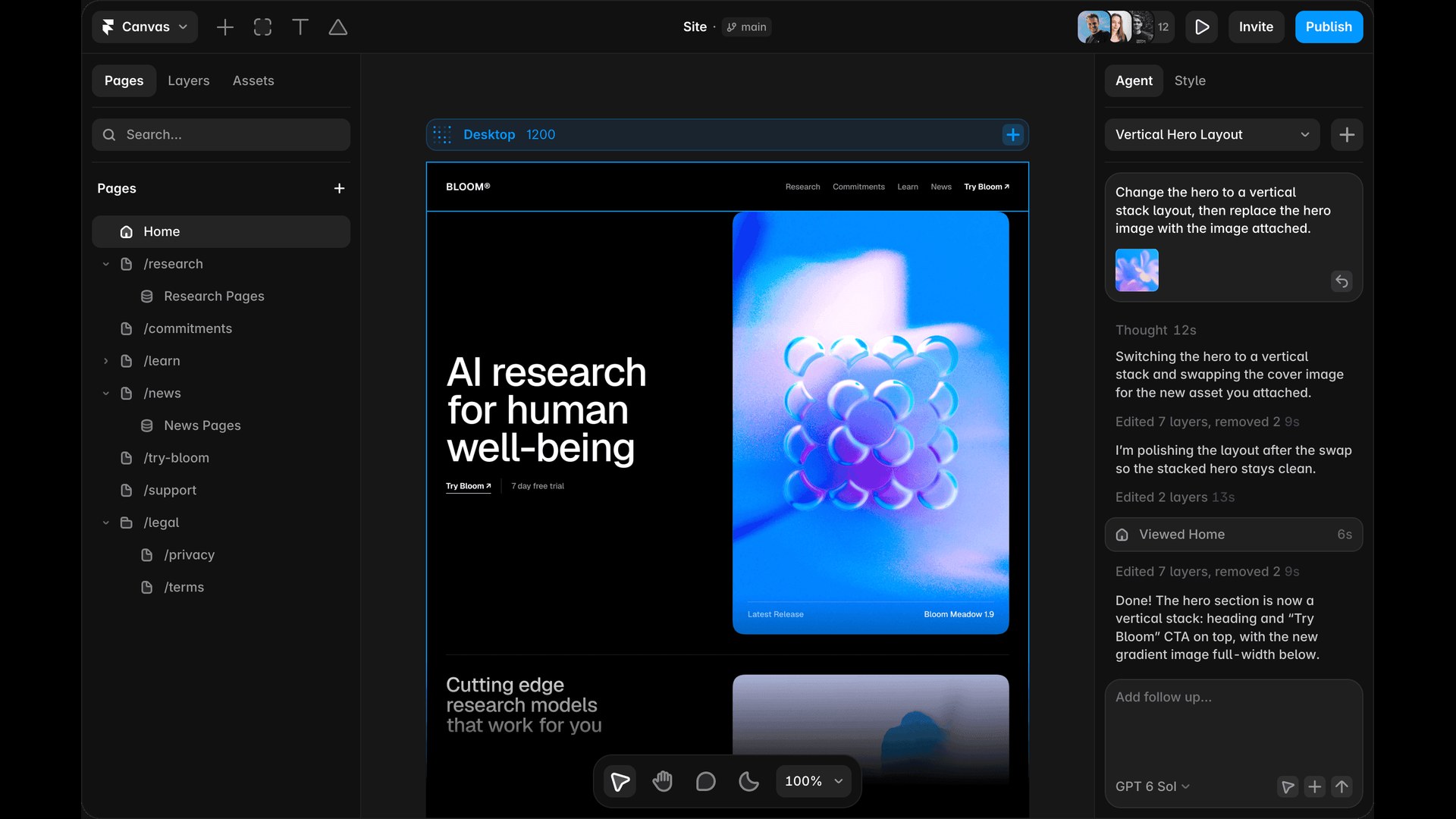
Framer’s built-in Agent in the editor, restacking a hero section and swapping its image. Image: Framer
Two lessons from our own projects:
On Framer: in September 2026, replacing a whole CMS article body through the API deleted the videos embedded in it. Back up rich-text fields and check embeds after any API write.
On Webflow: in August 2026, a publish blocked by one invalid CSS declaration still returned success from the API. After an agent publishes, check that the live page actually changed.
2. What can an AI agent read on your site?
First, a scope note: Google says its Search doesn’t use llms.txt files or special Markdown versions of pages, so adding them won’t improve your Google rankings. They can help AI agents and assistants that fetch your pages directly. The other checks below, structured data, freshness dates and crawlable menus, also matter for search engines.
Markdown for agents. Framer serves a Markdown version of a page to agents that ask for it, on all plans. We confirmed it on our own site in October 2026. On Webflow this is an Enterprise feature; the other Webflow sites we checked returned HTML.
llms.txt. Both support it: Webflow through an upload in SEO settings, Framer through Files on Pro and above.
Structured data. Webflow has a native schema field on every page, including CMS templates. Framer handles schema through custom code with CMS variables. One trap we found in our October 2026 site audit: schema placed in a CMS field rendered inside an iframe on our Framer site, and Google’s Rich Results Test did not list it. Keep JSON-LD in the page head.
Freshness dates. Webflow’s sitemap includes last-modified dates. Framer’s does not, and you can’t edit it.
Menus and overlays. Content inside Framer overlays, often a mobile menu, is not crawlable. Link important pages from normal page content too.
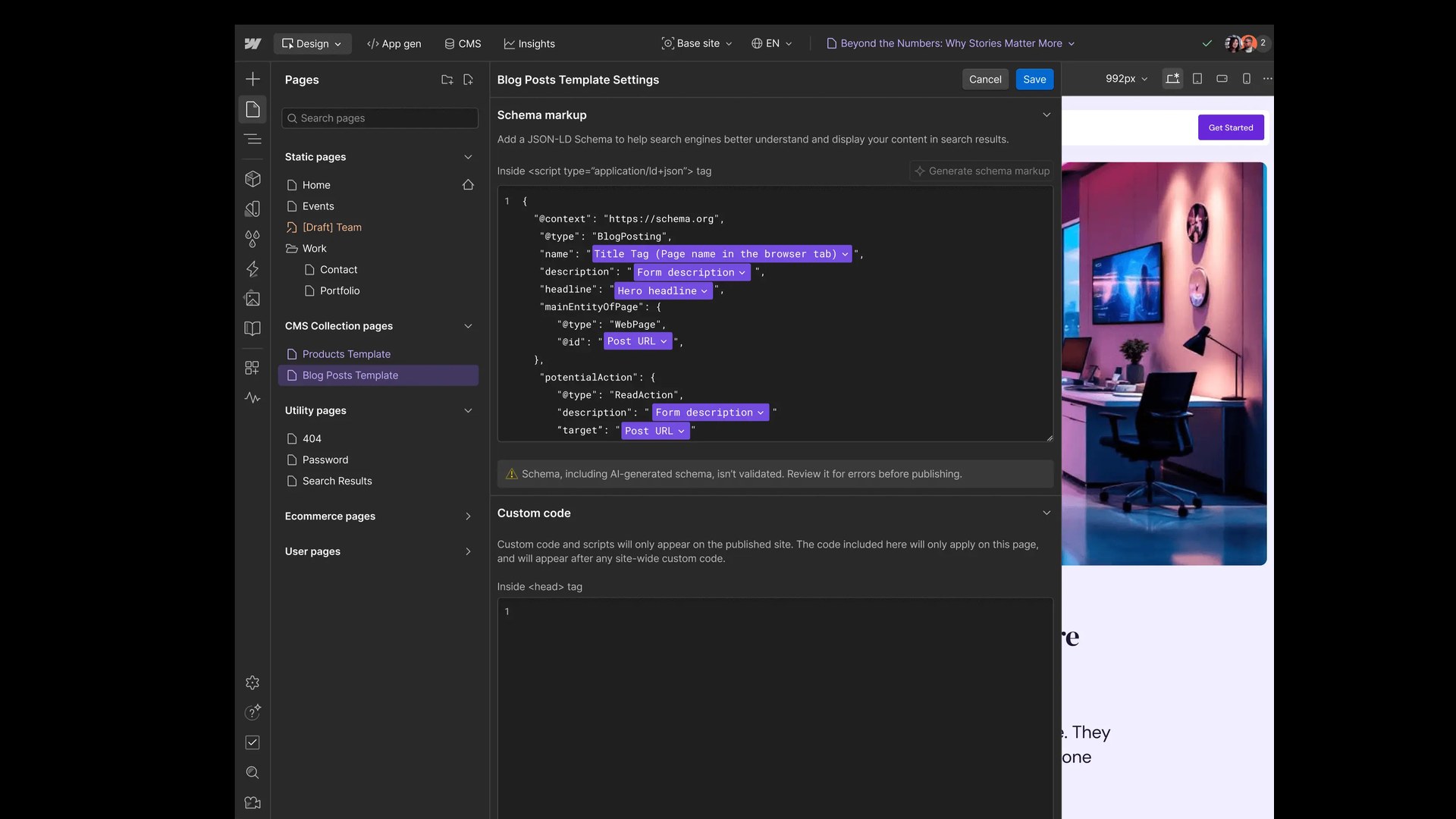
Webflow’s native schema field on a CMS template, with CMS fields bound into the JSON-LD. Webflow notes that AI-generated schema isn’t validated. Image: Webflow
3. Is one of them faster?
Not in a way you should choose on. In HTTP Archive’s real-user Chrome data for September 2026, 70.8% of 11,319 Framer sites and 71.3% of 59,483 Webflow sites passed Core Web Vitals on mobile worldwide. In the US it was 81.7% of 1,966 Framer sites and 80.2% of 16,374 Webflow sites. These are different groups of sites, not the same site tested on both platforms. Framer does better on loading (83.4% of its sites pass LCP, against 78.6%), Webflow on responsiveness (88.0% pass INP, against 80.3%).
On our own Framer site, audited in October 2026, each page’s HTML holds the desktop, tablet and phone versions together: 427 KB to 1 MB raw, or 42 to 62 KB compressed, with the main heading repeated three or four times. Audit tools flag that as “multiple H1s”; it comes from how Framer renders its breakpoints. On our site, media weighed far more: one hero video outweighed every page’s HTML, and neither platform stops you shipping one.
4. How much content will you have?
Webflow includes more at its standard price. Premium covers 40 collections and 20,000 items, with up to 10 reference fields per collection, and its CMS templates get native schema. Framer Pro covers 10 collections and 2,500 items and reaches 40 collections and 40,000 items through paid add-ons. Multi-reference fields exist on Framer.
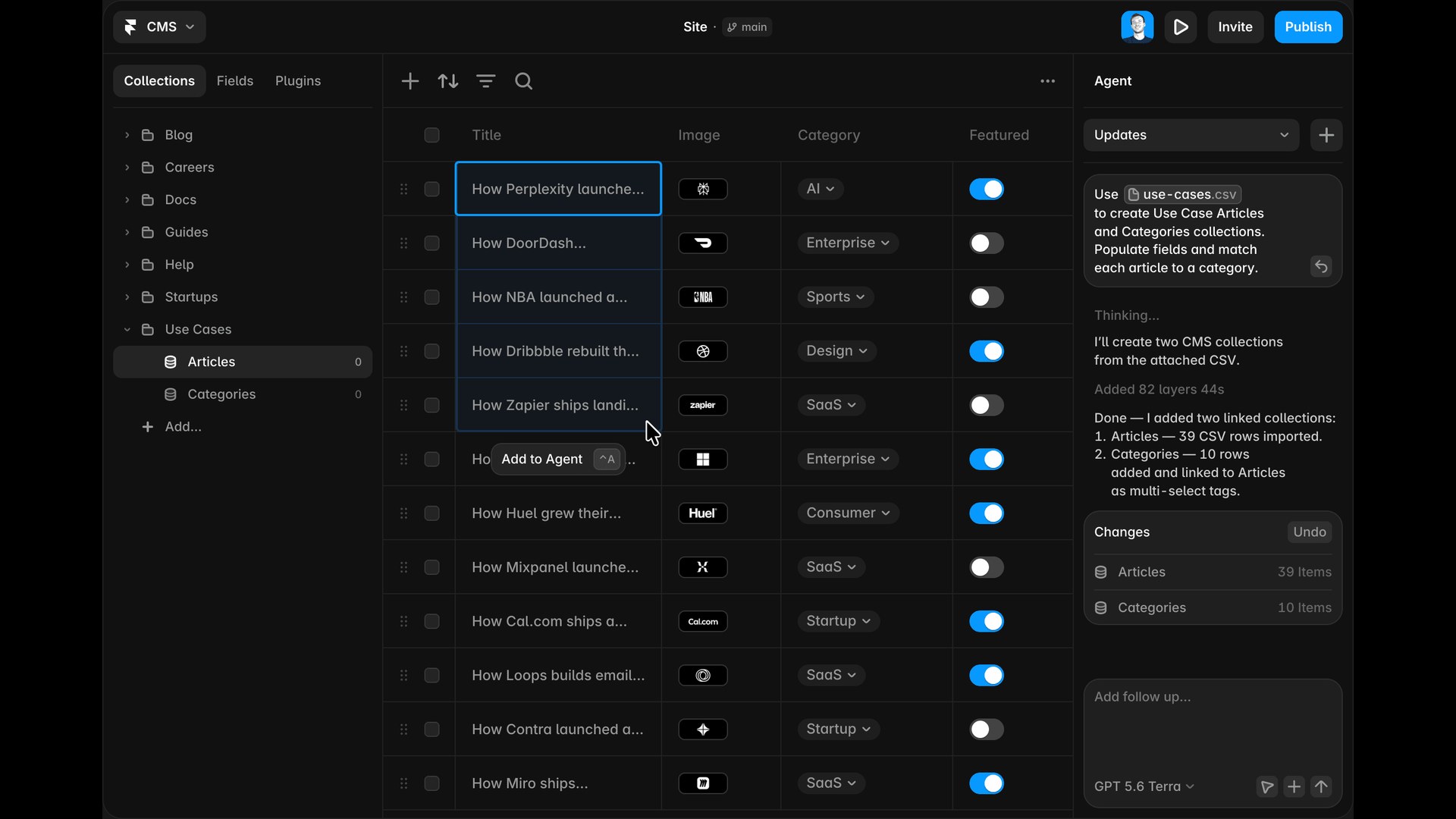
Framer’s CMS, with its Agent creating linked Articles and Categories collections from a CSV. Image: Framer
So for a large glossary, an integrations directory, job listings or programmatic pages, Webflow does more without add-ons or custom code. For a blog, case studies and a resource library, Framer is enough.
One check worth doing on either platform: look at what your components actually output. A rich-text image component can publish images with empty alt text even when the CMS has alt text for them.
5. Running campaigns
A/B testing: Framer’s Convert add-on costs $50 per 500,000 events on Pro. Webflow Optimize starts at $299 a month on yearly billing.
Translation: Framer charges $20 a month per locale. Webflow Localize starts at $9 a month per locale on yearly billing, with localized URLs on its Advanced tier.
Reviewing changes: both let you check work on a staging domain before you publish. The difference is isolated branches. Framer includes branches with previews on Pro. Webflow’s page branching needs the Team plan, and Webflow announced whole-site “Releases” in September 2026, due in beta later this year.
6. What a small marketing team pays
Note: prices are per month on yearly billing, checked on October 13, 2026 on webflow.com/pricing and framer.com/pricing. Both platforms change them often.
Framer: Pro is $30 per site. Each additional editor is $20 and each content editor $10; viewers are free.
Webflow: Premium is $25 per site. Paid workspace plans start at $19 (Core), and seats cost $39 for a full editor and $15 for a limited one. Team is $2,500 with seats and governance included.
For a designer and two marketers, add up the site plan, the seats or editors you need, and any add-ons. Webflow’s bill jumps if you need page branching or publishing workflows. Framer’s grows if you need more CMS capacity.
7. What if you want to leave?
Framer has no site-code export. Webflow can export static code on paid workspace plans, but not your CMS content, which comes out as CSV or through the API. Moving between Webflow and Framer means rebuilding in the destination editor, mapping CMS content, porting SEO fields and schema, and redirecting any URL that changes. Exporting a static Webflow site to host elsewhere is a different path.
What your team gets from this decision
Clear publishing ownership: decide who reviews a change and who can make it live.
A content model that fits: check collections, references and schema before you commit.
A budget you can use: put editors, CMS capacity and add-ons in the same estimate.
Where Rango fits
Our own site runs on Framer, and we are a verified Framer Expert. Every agent edit on our site goes through a branch we review before publishing.
We have built eight client sites on Webflow, including LakeFusion, Frisco Analytics, CodiFi, Symbo and Alnatum. We are a Webflow Certified Partner. Agents there get a limited role, and we check the live page after each publish.
We recommend per project. A large, structured content model points to Webflow. A design-led team that ships changes every week points to Framer.
See our Webflow and Framer work, read how to connect Claude or ChatGPT to Webflow, or book a call and bring your CMS outline, editor roles and publishing needs.
FAQ
Is Framer good for SEO?
Yes for most B2B marketing sites. It has editable robots.txt, redirects with wildcards on Pro, and llms.txt on Pro. It has no sitemap last-modified dates, and schema needs custom code in the page head.
Is Webflow better than Framer for SEO?
Neither ranks better by itself. Webflow needs less custom work on large or structured sites: native schema on CMS templates, sitemap freshness dates and bigger CMS limits at its standard price.
Does Framer have an MCP or work with Claude?
Framer uses External Agents rather than an MCP server: run npx @framer/agent setup, and agents such as Claude Code edit your site on a branch. Webflow has an official MCP server on all plans.
Do Framer and Webflow have built-in AI agents?
Yes. Framer’s Agent edits content, layouts, interactions and code on your canvas and runs on AI credits: 1,000 a month on Basic, 3,000 on Pro. Webflow AI is on every site plan, though some Starter features need a paid workspace, and the Team plan adds AEO agents for AI search visibility. Both also work with external agents such as Claude Code.
Which is cheaper?
Entry plans are close: Framer Basic $10 and Pro $30 a month, Webflow Basic $15 and Premium $25, all on yearly billing, before seats and add-ons. Isolated branches cost far less on Framer: they are on Pro, while Webflow’s page branching needs the $2,500 Team plan, and Enterprise for agents working through MCP.
Is Webflow or Framer faster?
Their real-user pass rates are close. Test a few representative pages with your own media, scripts and content before choosing on speed.
Can you move from one to the other?
Yes, but moving between their editors means a rebuild. Framer has no site-code export. Webflow exports static code on paid workspace plans, with CMS content exported separately as CSV or through the API.
Sources
Pricing: webflow.com/pricing, Webflow plan changes, 2026, framer.com/pricing
Agents and APIs: Webflow MCP 2.0, Framer External Agents, Framer Server API
AI readability: Framer, readable by AI agents, Webflow Markdown for agents, Webflow llms.txt, Framer llms.txt, Google Search guidance on AI files
Branching and collaboration: Webflow page branching, Webflow staging
Overlay crawlability: Framer help
Real-user Core Web Vitals, September 2026: HTTP Archive (worldwide), HTTP Archive, US
Built-in AI: Framer, how to use Agents, Framer, AI credits and Agent pricing, Webflow AI and AEO agents

Sagar Ludhiyani
Published On
Share on